Ad

Designing / layout tools?

Airbryan61

New member
Hello,

I am in a "holding pattern" while I wait for the banks and lawyers.... and while I wait, I want to design my Yurts. I want to design and layout the doors, windows, interior walls, place some furniture, etc... would also like to do some platform/deck design. Is there a specific software package others have used for this purpose that doesn't require a massive training curve?

Thanks for your input
 
Hmm, my wife was using some software to design the family room. She is out with the kids at the moment, but when they get home tonight I will find out what it was and post it tonight. She is not very tech savvy so I can't imagine it being too difficult to understand.
 
Thank you very much. I just started playing with it... looks like it is going to be fun. It may be a while... but I will post what I draw.
 
Aloha... and thanks for asking...The plan is to build a Family ranch on between 1 and 3 acres on the Big Island of Hawaii. We will be building 3 yurts, completely permitted, but off grid, eventually. We will hook onto HELCO in the beginning, but will be septic, water catchment with UV filtering, and eventually, Solar. Then, we will building a fairly large aquaponics system and be as self sustainable as possible. Lots of plans... just waiting for things to settle with banks and stuff on the mainland. Hope to be getting started before Oct.
 
Perhaps you already know, but the owner of Yurts of Hawaii is a member here. She is what we call an Industry Specialist. She knows all the ins and outs of building, permitting, customizing yurts. Here is her profile:

Yurt Forum - View Profile: HawaiiYurts

She might be able to help you out if you run into any troubles along the way. :)

- Jeff
 
Aloha Bryan, Google Sketch is another great tool. Bit of a learning curve, but it's free and I've seen some impressive results with it! We do custom drafting for the building permit process, as it has to be 'just so' for the county, but it's always nice to work with people who have put some thought into design and have a model to review.
 
Jafo......thanks for posting that link to Floorplanner, great fun......... been having so much fun and it's so intuitive that it's taken a few days to get around to reading the downloadable manual.
 
I've been checking out the Floorplan software, can anyone give me the clue on how to draw the initial circle there? Mahalo!
 
I haven't played around with it that much, maybe djspn can fill us in? :) I'm afraid everyone says my design skills are too Spartan and utilitarian (function over form et all) that I gave up years ago lol..
 
I've been checking out the Floorplan software, can anyone give me the clue on how to draw the initial circle there? Mahalo!

Hi Melissa..........first off, thank you very much for all your knowledgeable contributions here.
What I did, and haven't seen a better way after reading the manual:
Set easy to work w grid settings via the WRENCH icon, upper right, the bottom line is Grid settings ( 5 and 5 works well).
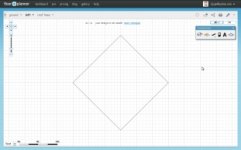
Using the WALL tool (3rd from left in the construction box) create a square rotated 45*, the diagonal being the diameter of the yurt (see attachment for 30'yurt).
Click on a wall
Click the Info Button "I"
Select WALL in the dropdown
Click the curved icon, top right
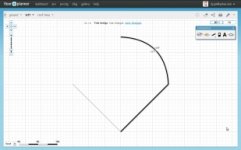
You can now curve each wall to create a round shape, the gridlines will help you keep the cursor in the middle of the wall as you curve it, get the numbers the same for each wall,think it is 23.55' (30x3.14/4) for a 30' yurt, (see attachment) , enlarging the view will help w this step.
Sounds complicated, but if you take it step by step, I think it should be straightforward, ask again if it's not clear.
Good luck and again thanks for your contributions here
 
Last edited:
oops.....forgot to upload the attachments.
 

Attachments

  • square.jpg
    square.jpg
    20.4 KB · Views: 1,291
  • curve.jpg
    curve.jpg
    20.3 KB · Views: 1,295
Ahh Awesome! Thank you for the play by play, I hope to get back to experimenting with it this weekend. I'm enjoying this forum, thankful to Jafo for all his hard work. It's always a joy to share yurt knowledge.
 
Jalo......is there a way to delete a recent post?
If I hover over the EDIT button it says EDIT/DELETE POST, but after clicking the EDIT button I see no option to delete.
I'm playing around w images of something I've worked up on Floorplanner but haven't yet figured out how to display them in appropriate scale, don't want to clutter the thread w experiments.
Thanks
 
Last edited:
You can only delete a post after a certain amount of time. What post are you looking to delete?
 
I was trying to delete my previous one, #18.
I could still see the EDIT button, but didn't see a way to delete.
Be good to know for future reference, like it said, don't want to clutter the thread w experiments til i figure out how to appropriately scale images.
 
Last edited:
Back
Top